Clarify the Checkout Task for Verifying trapstar Hoodie Coupons If you're planning to check the Trapstar fall/winter hoodie on fashionreps, the first thing you actually need to confirm isn't "where is a coupon?" but whether a particular coupon applies to the current product, current variant, current cart, and your chosen purchasing agent. Coupon entry points, minimum thresholds, validit
Clarify the Checkout Task for Verifying trapstar Hoodie Coupons
If you're planning to check the Trapstar fall/winter hoodie on fashionreps, the first thing you actually need to confirm isn't "where is a coupon?" but whether a particular coupon applies to the current product, current variant, current cart, and your chosen purchasing agent. Coupon entry points, minimum thresholds, validity periods, account requirements, and excluded items can all change, so you can't rely solely on search results or old screenshots. 🔎
This article is for buyers who are ready to order but haven't completed payment yet. After reading, you should be able to record product evidence, check coupon conditions item by item, and verify on the checkout page that the discount is actually applied. It doesn't apply to operations that attempt to avoid taxes, hide product value, or bypass platform checks.

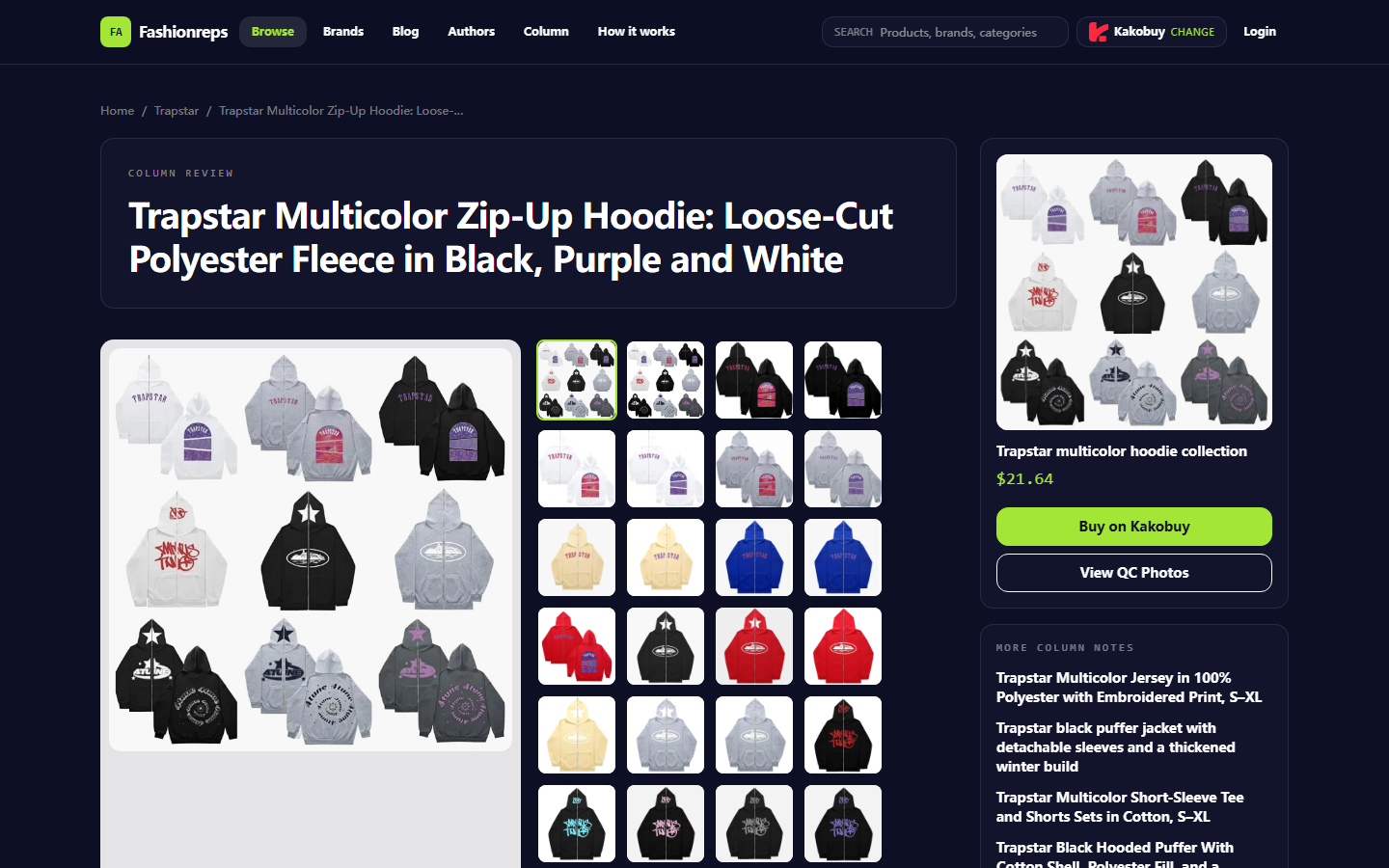
Image: Trapstar hoodie product info page on fashionreps. You still need to confirm prices, service fees, and international shipping on the actual purchasing agent page before ordering.
Record Style, Color, Size, and Current Visible Info from the fashionreps Product Page
First, fix the current product's basic info on the fashionreps product page to avoid mixing up another item or color when checking the coupon. We recommend recording the following:
- Product name and page URL
- Style type, e.g., zip-up hoodie or pullover hoodie
- Color or code variant
- Planned size
- Reference price and currency shown on page
- Material, thickness, fit, and graphic info listed on page
- Whether the page indicates that further steps need to be completed through a purchasing agent
- Record date and time zone
Current product info shows this Trapstar multi-color zip-up hoodie is listed as polyester fleece, regular thickness, loose fit, with colors including black, dark purple, and white, and sizes from S to XXXL. The page also shows a reference price of about $21.64, and another page price of $23.15; these prices cannot be directly considered the final payment amount because service fees, international shipping, and other costs need to be confirmed on the purchasing agent page.
Size info should be kept separately. The page only provides sizes S to XXXL and a loose fit, and publicly available size recommendations are inconsistent, so don't mix coupon verification with size judgment. Before paying, ask the seller for flat measurements in centimeters for chest, shoulder, and length. 📏
Find Current Visible Coupon Entry Points, Validity Periods, and Applicable Scope on the Target Site
The buy button on the fashionreps product page will redirect according to the selected purchasing agent. Coupons are usually not provided directly on the product listing page; they may appear on the purchasing agent's homepage, activity page, account coupon center, cart, or checkout page. When verifying, you should look along the actual purchase path rather than using old coupon codes forwarded by third parties.
We recommend checking in this order:
- Confirm the current product and variant on the fashionreps product page.
- Check the agent name currently selected by the buy button to avoid applying one agent's coupon to another.
- Enter the target agent's official page or official account area from the button.
- Look for the coupon center, activity announcements, cart prompts, and checkout page coupon section.
- Record the coupon name, whether the code needs to be entered manually, applicable currency, validity period, minimum spend, and applicable order type.
- Take or save page evidence that shows the conditions, but cover account, order, address, and payment info.
If the page only shows "promotion," "activity," or "limited-time discount" without clear amount, discount percentage, start and end time, and applicable conditions, don't record it as a confirmed coupon. When there's no verifiable current coupon code or official activity details, this article can only provide a verification method and cannot guarantee savings. ⚠️
Check Minimum Thresholds, Excluded Items, Account Requirements, and Non-Stackable Rules
To verify coupon applicability, you need to check at least six items. You can copy the official page's original text item by item into your order record and compare with the current cart:
- Minimum spend: Confirm whether it's calculated based on product subtotal or after adding service fees and shipping.
- Applicable products: Confirm whether the Trapstar hoodie is part of the activity items, and whether specific brands, categories, links, or clearance items are excluded.
- Applicable variants: Confirm whether all colors, sizes, or code variants can use the coupon; don't assume all variants on the same page have the same conditions.
- Account conditions: Confirm whether it requires new users, specific regions, specific account levels, logged-in status, or specific payment methods.
- Validity period: Confirm the deadline, time zone, and whether it's based on order submission time or successful payment time.
- Stacking rules: Confirm whether it can be combined with store discounts, platform activities, shipping coupons, or other coupons.
If the official conditions don't state whether "product price" includes service fees, don't infer it yourself. The coupon amount may only apply to the product subtotal, or only to service fees or international shipping. 🧾
Recheck on the Same Product Variant Whether the Coupon Appears on the Checkout Page
When verifying the coupon, the cart must contain exactly the same product variant as your planned purchase. Don't test with a cheaper size or different color first and then treat that result as the conclusion for the target variant.
Before proceeding to checkout, confirm in this order:
- Product name is still the target Trapstar hoodie.
- Color, code, and size haven't been reset by the system.
- Quantity meets the coupon threshold, and no unwanted add-on services have been automatically added.
- The correct purchasing agent is selected.
- The coupon section shows a specific coupon name, discount amount, or percentage.
- The product subtotal before and after applying the coupon matches your calculation.
- Service fees, warehouse fees, international shipping, taxes, or other pending fees haven't been mistaken as waived.
- The coupon status is still visible before final submission, without "invalid," "not applicable," or "conditions not met."
If the checkout page doesn't show a clear discount, pause payment. Don't assume the coupon is applied just because a coupon entry appeared earlier. If the system says the code is invalid, first check the agent, account, currency, product variant, and validity period, then ask official customer service for confirmation. ✅
Separately Record Page Facts, Coupon Conditions, and Pending Fees
To avoid treating reference price as final cost, we recommend dividing records into three categories:
| Record Category | What to Record Now | What Cannot Be Concluded Directly |
|---|---|---|
| Product page facts | Style, color, size, material, page price, page update time | Cannot confirm final payment amount or coupon eligibility |
| Coupon conditions | Official coupon name, threshold, validity, exclusions, account conditions, stacking rules | Cannot confirm the target variant is definitely discounted |
| Pending fees | Service fees, international shipping, taxes, add-on service fees, payment fees | Cannot guarantee total cost or savings before checkout |
The reference price on this product page can only be recorded as the product price. Service fees and international shipping should be re-confirmed in the selected purchasing agent's checkout process, and destination country taxes and import requirements should be handled according to destination rules. Don't under-declare product value, split orders to avoid checks, or use information that doesn't comply with platform rules just to get a coupon. 🌍
Steps to Pause and Seek Confirmation When Coupon Info Is Missing or Abnormal
Pause payment if any of the following occur:
- Coupon page doesn't have a clear validity period or applicable region.
- Page only shows promotional slogans without actual discount conditions.
- Product page price differs significantly from agent checkout page price without explanation.
- Coupon code shows as claimable but can't be used on the target variant.
- Coupon is only visible when not logged in, and disappears after login.
- Checkout page mixes coupon amount, service fees, and shipping together, making it impossible to verify.
- Purchasing agent or activity page redirects, and you can't confirm the current domain and account status.
When seeking confirmation, only provide necessary product name, variant, coupon name, and error message. Don't share full order number, address, phone, passport, payment card info, or complete shipping label. If screenshots are needed, cover personal and payment info while keeping areas showing product variant and coupon prompt.
Final Action Checklist Before Completing Your trapstar Hoodie Checkout
Check off each item before payment:
- [] Saved product name, color, size, and record date from fashionreps product page.
- [] Confirmed the purchasing agent corresponding to the current buy button.
- [] Obtained coupon conditions from the target agent's official page or account area.
- [] Checked minimum spend, excluded items, account conditions, and validity period.
- [] Confirmed whether it can be combined with other discounts.
- [] Tested the coupon on the same product variant.
- [] Checkout page shows a clear discount amount or percentage.
- [] Recorded product subtotal, service fees, international shipping, and taxes separately.
- [] Made no savings promises for unconfirmed fees.
- [] Paused payment and sought confirmation from official channels if any abnormality remains.
Only when the coupon clearly takes effect on the checkout page for the target variant, and the fee breakdown is explainable, can you mark it as verified. If the coupon doesn't apply, continuing to pay shouldn't be based on "it might be refunded later." When there's no code or discount, the safest result is to keep the current product and fee records and wait for official conditions to become clear, rather than risk ordering with an unverified code.
Nadia Brandt is the site's Editor-in-Chief, reviewing important corrections and leading its quarterly shipping-line timing study. Her coverage includes shopping-agent fee structures, parcel consolidation and volumetric weight, EU-bound shipping timelines, personal-import customs paperwork and QC photo interpretation. Each quarter, she sends paired 2 kg and 5 kg test parcels along every line the desk covers, logging pickup scans, warehouse departure, airline departure and delivery dates against the date the quote was issued. She reconciles the parcels with agent invoices, records cost differences, and uses median figures for the site's public timing tables. She maintains the order log in which scores are fixed before page performance is checked. Her coverage explains the transport milestones and invoice checks behind comparisons of shipping times.