When the QC (Quality Control) link on a Dior product page won't open, images don't display, or copying the link into Google Sheets results in an inaccessible address, don't repeatedly refresh, click again, or jump to conclusions about product quality. This issue needs to be broken down into three checks: can the product be relocated in the fashion-reps Spreadsheet, is the QC link actually broken, and is the current state just temporarily unverifiable? 🔎 This article is for situations where you'
When the QC (Quality Control) link on a Dior product page won't open, images don't display, or copying the link into Google Sheets results in an inaccessible address, don't repeatedly refresh, click again, or jump to conclusions about product quality. This issue needs to be broken down into three checks: can the product be relocated in the fashion-reps Spreadsheet, is the QC link actually broken, and is the current state just temporarily unverifiable? 🔎
This article is for situations where you've already found a Dior product listing and are trying to organize product details and QC information, but can't confirm the image link status. After reading, you should be able to complete a verifiable record and know when to stop and when to escalate to the purchasing platform's support. This article does not cover authenticity, material quality, craftsmanship, or seller reliability.

First, Define the Dior QC Image Link Problem
Write down observable symptoms instead of jumping to conclusions like "no QC" or "seller deleted images." Common symptoms include:
- Product page opens, but clicking the QC link doesn't open a new page.
- QC page is blank, fails to load, or image area doesn't display.
- Copied link returns an error in the browser, but the product name still appears in the website Spreadsheet.
- The same link sometimes opens in the browser but doesn't work when pasted into Google Sheets.
- Product listing exists, but you can't confirm which product or time point the QC images belong to.
These symptoms mean different things. A missing page might mean the listing has no visible QC link; a broken link might be an expired URL, failed redirect, or changed target page; "temporarily unverifiable" means current evidence is insufficient, and you shouldn't turn a technical issue into a quality conclusion. 🧭
The troubleshooting goal should be limited to: confirming the product identity, saving visible links, recording access times, distinguishing link states, and preserving information needed for later support requests.
Record Visible Evidence from the Product Page and QC Link
After opening the product page, first record what's directly visible:
- Product name or title.
- Dior brand category or the product's category.
- Full URL of the product page, if visible in the address bar.
- Reference price and currency, if displayed.
- Any visible fields for size, color, material, dimensions, or style.
- Original display state of the QC button, text link, or image area.
- Access date and time, preferably in Beijing time.
Don't treat unverified content from the browser address bar as a valid QC link. Copy it separately and open it in a new tab; if the page requires login, redirects to the purchasing platform, or shows a permission prompt, record that as the current state.
Use descriptions like:
"Product name visible, Dior category visible, QC link present but opens to a blank page; as of October 13, 2026, Beijing time, image content unconfirmed."
The key here is "unconfirmed," not "no images." Only record a more specific state if the page clearly shows nonexistence, deletion, or an error that can be consistently reproduced. 📝
Relocate the Product in the fashionreps Website Spreadsheet
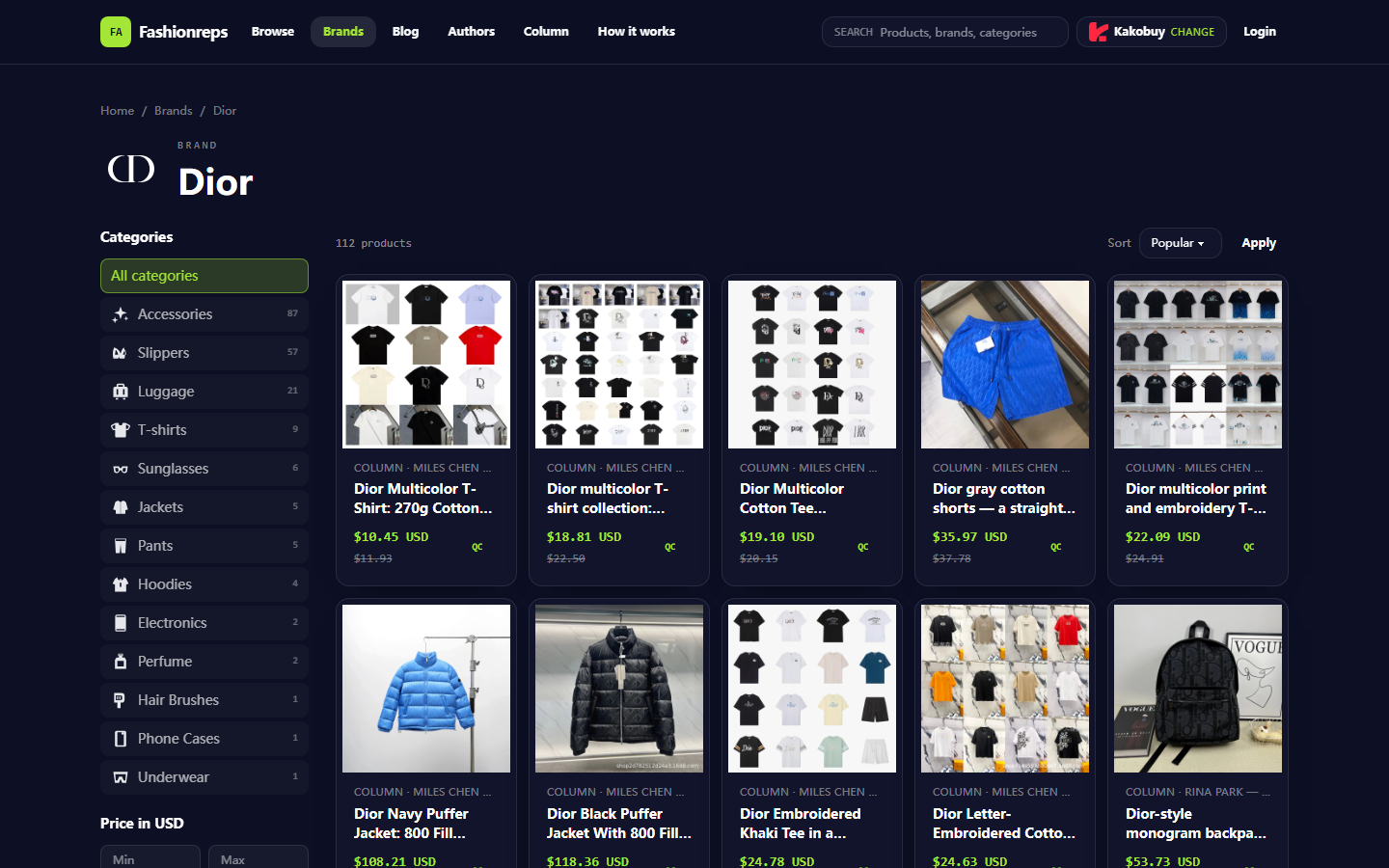
The Dior brand page on fashion-reps offers product filtering and list browsing; the page summary shows you can search by category, price range, and sorting. When relocating, prioritize stable fields from the product title rather than relying solely on the brand name "Dior."
Follow this order:
- Search or filter by unique phrases from the full product name, such as color, category, style, or distinctive size.
- Narrow by product category, e.g., T-shirts, jackets, bags, or accessories.
- Cross-check reference price, color options, size range, or dimension descriptions.
- Open candidate listings and confirm the title and detail fields match.
- Put the relocated product listing and the original QC link in the same troubleshooting record.
If multiple similar products appear, don't merge them based on title similarity alone. The page summary lists multiple Dior T-shirts, jackets, and bags, some with different prices, colors, and size ranges. Keep at least two distinguishing fields, such as product title plus reference price, or title plus size range.
If the product is found in the Spreadsheet but the detail page lacks a QC link, record "product locatable, QC link not visible," not "QC images don't exist." If product name, category, and other fields don't match, record "candidate product unconfirmed" and stop expanding the search.
Record Links, Image Status, and Times in Google Sheets
Google Sheets is for preserving the troubleshooting process, not replacing the product page. Each row should correspond to one product and one verification time to avoid mixing QC states of multiple products.
| Field | How to Fill In |
|---|---|
| Product name | Copy the visible name from the page; don't rewrite it with stronger marketing language |
| Product category | Fill in the category shown on the page, e.g., T-shirts, Jackets, or Bags |
| Product page URL | Save the actual URL you opened |
| QC link original text | Fill in the button, text link, or "no link visible" |
| QC address | Only fill in the actual copied address; leave blank and note the reason if unconfirmed |
| Image status | Opens, blank, error, login required, redirect, or unconfirmed |
| Verification time | Fill in date, time, and time zone |
| Evidence notes | Record page prompts, screenshot numbers, or visible fields |
| Next step | Continue verification, retry later, contact purchasing platform, or stop |
Don't interpret "opens" as "images are authentic" or "image displays" as "quality verified." Google Sheets only stores link and evidence status; it cannot replace physical inspection, size measurement, or the purchasing platform's QC service.
If the address contains order numbers, personal information, payment details, or complete shipping information, first confirm whether redaction is needed. Don't put passports, payment cards, complete shipping labels, or identifiable personal addresses into a shared sheet. 🔐
Distinguish Page Missing, Link Broken, and Temporarily Unverifiable
Use three categories to stay consistent:
Page missing: Product listing can be located, but the page has no visible QC link, image area, or related description. Record what the page actually shows and keep the verification time.
Link broken: QC address was previously copied or the page showed a link, but opening it consistently results in error, blank, no permission, or failed redirect. Verify at least once more, and confirm it's not due to network switching, login status, or browser cache.
Temporarily unverifiable: Page sometimes works, sometimes fails, or you can only see the link but can't confirm the target content. Don't mark it "broken" or "passed"; keep the intermediate state and recheck when conditions allow.
When rechecking, change only one variable at a time. For example, first reopen in the same browser, then check login status; don't simultaneously change browser, network, device, and proxy, or you won't know which factor changed the result.
Official Help Path After Stopping Repeated Clicks
Stop clicking repeatedly when any of the following occurs:
- The same address consistently returns an error or blank page.
- The page requires login, but you don't have the account or authorization.
- You're asked to enter order number, payment details, personal identity information, or other sensitive data.
- The QC address leads to an unidentifiable third-party page.
- You can't determine which product the current link corresponds to.
- Repeated refreshing may cause duplicate requests, duplicate submissions, or new order actions.
When seeking help, first confirm which purchasing platform or agent you used. The fashion-reps page provides a purchasing platform selector; actual ordering, warehousing, QC, logistics, and after-sales usually go through your chosen platform's order support channel. When submitting a ticket, provide only necessary information: product name, product page URL, QC link status, verification time, error message, and redacted screenshots.
Use this template:
"I found this Dior product listing on fashion-reps. The detail page can/cannot open; the QC link currently shows [state]; I verified at [time] on [device], and the result was [error/blank]. Please confirm whether this QC link is still valid and whether there is a corresponding order or warehouse record."
Don't ask support staff to send complete shipping labels, passports, bank cards, or unredacted order screenshots via public chat. If they request more information than necessary to resolve the issue, pause and verify the channel's identity.
When You Cannot Judge Quality or Authenticity from This
QC link problems only indicate an issue with the current access path or record state; they cannot alone prove poor quality, seller non-shipment, counterfeit goods, or fraud. Even if QC images open, that only means you see a set of images, not that they correspond to current inventory or the final shipped product.
Similarly, reference price, product title, color count, and size descriptions are visible page information, not proof of physical measurement, confirmed inventory, material, or brand authorization. When it comes to Dior logos, similar designs, or authenticity, avoid conclusive terms like "genuine," "guaranteed," or "verified authentic" unless you have applicable and verifiable official evidence.
If page information conflicts with purchasing platform order information, use the actual order, warehouse record, and platform customer service confirmation as the basis for further action. Don't immediately reorder just because QC images won't open, and don't skip checking size, color, quantity, and after-sales conditions just because images open. ⚠️
Final Troubleshooting and Documentation Checklist
Before completing a troubleshooting session, confirm the following are in your records:
- Confirmed product name and at least one field distinguishing similar products.
- Saved product page URL or noted why it couldn't be saved.
- Recorded visible text and current state of the QC link.
- Distinguished page missing, link broken, and temporarily unverifiable.
- Recorded verification date, time, time zone, and environment.
- Bound the QC address to the product and time, not stored separately.
- Redacted order numbers, addresses, phone numbers, and payment info in shared records.
- Set the next step: continue verification, retry later, contact chosen purchasing platform, or stop.
- Did not write link status as a conclusion about quality, authenticity, or inventory.
This record-keeping method's value is reducing repeated clicks and misjudgments, making it easier to hand a specific technical issue to the correct purchasing platform support channel. It doesn't guarantee QC links will recover, nor does it replace warehouse inspection or after-sales judgment.
Nadia Brandt is the site's Editor-in-Chief, reviewing important corrections and leading its quarterly shipping-line timing study. Her coverage includes shopping-agent fee structures, parcel consolidation and volumetric weight, EU-bound shipping timelines, personal-import customs paperwork and QC photo interpretation. Each quarter, she sends paired 2 kg and 5 kg test parcels along every line the desk covers, logging pickup scans, warehouse departure, airline departure and delivery dates against the date the quote was issued. She reconciles the parcels with agent invoices, records cost differences, and uses median figures for the site's public timing tables. She maintains the order log in which scores are fixed before page performance is checked. Her coverage explains the transport milestones and invoice checks behind comparisons of shipping times.